1. ECE265 — Continuous-Time and Discrete-Time Signals and Systems — 2026-09
Note
Please be sure to use the "refresh" button in your web browser to ensure that you are viewing the most recent version of this web document.
1.1 Accessing Course Materials
Some of the course materials associated with this web page (such as assignment solutions and exam papers/solutions) may be stored in a protected area. Typically, links to private areas of the website are marked by a padlock . In order to access protected course materials, you will need to know the appropriate username and password to use for the website. The username and password can be found in a post in the Announcements section of the Brightspace site for this course. See the Brightspace Site section for more information.
Warning
As explained above, the username and password for the course website are not the ones for your Netlink/faculty/departmental account!
1.2 Instructor
Michael Adams
E-Mail: mdadams (append "@ece.uvic.ca" for the complete address)
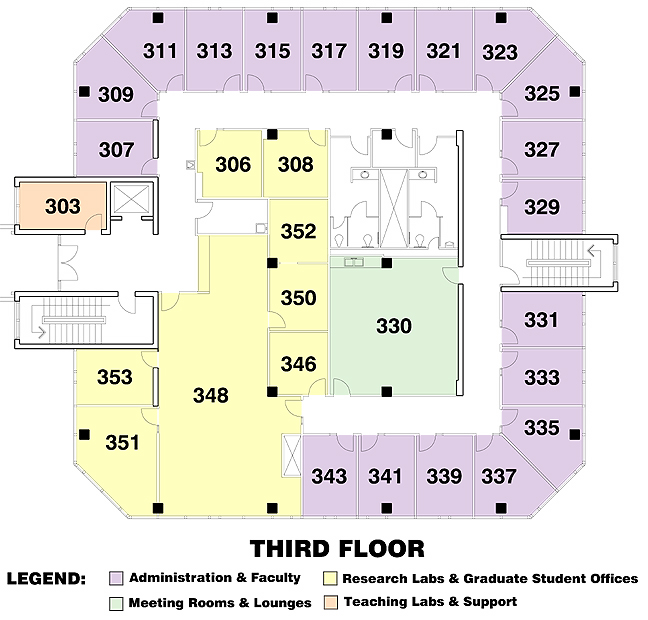
Office: EOW 311
1.3 Teaching Assistants (TAs)
The tutorial TAs and their email addresses are as follows:
-
T01: Mehrab NAJAFIAN ; e-mail: mnajafian@uvic.ca
-
T02: Ruilin WANG ; e-mail: ruilinwang@uvic.ca
The marker TAs and their email addresses are as follows:
-
M01: Amin MOHAMMADALI ; e-mail: aminmohammadali@gmail.com
-
M02: Alejandro RICO ESPINOSA ; e-mail: arico@uvic.ca
-
M03: Yifeng BIE ; e-mail: yifengbie@uvic.ca
-
M04: Aditya JOSHI ; e-mail: adityajoshi@uvic.ca
Marker TA Workload Distribution. For information on which marker TAs graded which assignments and midterm exams in the course, refer to the following document:
- Marker TA Workload Distribution (which contains information on which TAs graded which assignments and midterm exams).
1.4 Course Outline
The course outline is available through the following links:
-
an annotated copy of the course outline (using in the first lecture session) in the Course Logistics document (PDF format)
-
the official course outline (after publication by the University) as an online HTML document on the UVic Course Outline website [NOTE: The official course outline is published on a website that is controlled by the University, not the instructor. Furthermore, the University adds some information to the instructor's submitted course outline before it is published. For this reason, the official course outline is not guaranteed to available until after the start of the term.]
Course Logistics Document. The following document provides a copy of the course logistics slides and annotated version of the course outline as presented in the first lecture:
Course Grade Calculation. The following document provides very detailed information about how the final course grades are calculated:
1.5 General Teaching Strategy
This course is taught using a traditional lecture approach.
1.6 Brightspace Site
In addition to the website currently being viewed, the course also has a Brightspace site. A direct link to the Brightspace page for the course is as follows:
Although the course has a Brightspace site, the primary online source of information for the course is the website that is currently being viewed, not the Brightspace site. Brightspace is only used in a limited capacity for the course. In particular, Brightspace is used only for the following:
- posting important course announcements and other information, such as: assignment submission deadlines, midterm exam dates (if not already provided on the course outline), and the username and password required to access password-protected areas of the course website;
- submitting (and grading) assignments; and
- providing students with a means to review their grades in the course.
Students are responsible for reading all announcements posted on the Brightspace site in a timely fashion. For this reason, it is strongly recommended that students enable notifications (via email) for new announcements and other events on the Brightspace site.
Information on Brightspace. For help on the use of Brightspace, refer to the following link:
1.7 Online Meetings
Some meetings in the course are either held exclusively online or have the provision for online attendance. So, it is important for students to know how to attend online meetings. Detailed information on how to attend online meetings in the course can be found in the following document:
Meeting IDs and Passwords. The meeting IDs and passwords needed to join online meetings in the course can be found at the following password-protected link:
(Refer to the course outline for information on where to find the username and password required for accessing password-protected areas of this website.)
1.8 Lecture Sessions
First Lecture Session. The first lecture session will be used to provide an overview of the course and address many administrative matters. It is important that students not miss this first lecture session.
Lecture-Session Attendance. Students are responsible for all material covered in the lectures. So, students are strongly advised to regularly attend the lecture sessions.
Recording of Lecture Sessions. Normally, the lecture sessions will not be recorded by the instructor.
1.9 Office Hours
Office-hour sessions will be held by the instructor in order to provide extra help with the course materials as well as discuss other course-related matters with students. These sessions will be offered online only. (For details on how to attend online meetings, see the Online Meetings section.) Any private/confidential matters will be discussed one-on-one with the student in a breakout room. Any questions about course materials will be answered in the main room (i.e., not one-on-one) so that all students can benefit from the questions asked.
Office-Hour Schedule Excluding Final-Exam Period. The office-hours sessions are held via Zoom only (i.e., not face-to-face) using the same Zoom meeting ID/password employed for the lecture sessions. The office-hour sessions are scheduled (as determined via Brightspace survey) as follows:
- Wednesdays 07:30-08:20
with the following exceptions (if any):
- Wed Sep 30 office hours are rescheduled to Tue Sep 29 at 07:30-08:20 (since Sep 30 is a holiday)
Changes to the above schedule may sometimes be necessary. The above information will be updated as the term progresses, and changes to this information will be announced to the class as well. Also, this office-hour schedule only applies up until the last day of classes. This schedule does not apply during the final exam period.
Office-Hour Schedule for Final-Exam Period. The office-hour schedule for the final-exam period has yet to be determined, and is typically not chosen until close to the last day of classes. The schedule will be posted here as soon as it is known.
Other Remarks on Office Hours. The instructor's office hours are cancelled during reading break (and on holidays).
1.10 Tutorial Sessions
The tutorial time slots will be used by the tutorial TAs to hold sessions in order to help students with course materials. These sessions are to be held face-to-face. The names and contact information for each of the tutorial TAs can be found in the Teaching Assistants section.
Attending Sessions for Different Tutorial Sections. Sometimes a student may be unable to register in a tutorial section in a manner that is free of scheduling conflicts. If this situation arises, it is okay for the student in question to attend a session for a tutorial section different from the one in which the student is registered as long as this does not prevent students who are registered in the tutorial section from having a seat in the tutorial classroom. In general, it is okay to attend the sessions for other tutorial sections as long as the tutorial classroom has sufficient space. If the tutorial classroom does not have sufficient space, priority must be given to those students who are registered in the tutorial section.
1.11 Tentative Lecture Schedule and Lecture Examples
Warning
The lecture schedule provided is only intended to be very approximate. Since this is the first offering of ECE265, this schedule is based entirely on estimation and therefore will likely deviate very substantially from reality.
The course ECE265 is a completely new course and is being offered for the first time in the Fall 2026 term. As with the first offering of any course, there are many uncertainties about the precise timing of the course content. The instructor has prepared a draft schedule to help plan his teaching of the course. This draft schedule, by its nature, is only a very crude estimate. Therefore, it should be understood to be VERY APPROXIMATE and SUBJECT TO SIGNIFICANT CHANGE. The instructor plans to update this schedule as the term progresses. The approximate lecture schedule is available via the following link:
The examples that are tentatively planned to be covered during the lecture sessions are available in a Zip archive through the following links:
-
Most recent version (recommended):
- Lecture Examples (in Zip format)
- Note: To determine if this document has been updated since the last time you downloaded it, you can check the "Last Revised" date/time on the title page of either PDF document in the Zip archive.
-
Obsolete version from the start of the term (for reference only)**:
1.12 Required Texts/Materials
The following references are required for the course:
- Textbook.
- Michael D. Adams, Signals and Systems, Edition 7.0.0-beta.3, University of Victoria, Victoria, BC, Canada, 2026. Download link: PDF format.
- Lecture slides.
- Michael D. Adams, Lecture Slides for Signals and Systems [Unified Continuous-Time/Discrete-Time Coverage], Edition 7.0.0-beta.3, University of Victoria, Victoria, BC, Canada, 2026. Download link: PDF format.
- Companion archive (which contains supplemental files for the textbook).
- Michael D. Adams, Companion Archive for Signals and Systems, Edition 7.0.0-beta.3, University of Victoria, Victoria, BC, Canada, 2026. Download link: gzipped tar format.
- Some MATLAB exercises use MATLAB source code and data files provided in this archive.
1.13 Course-Materials Bug-Bounty Program (CMBBP)
By participating in the Course-Materials Bug-Bounty Program (CMBBP), you can earn extra marks in the course. If you are interested in obtaining extra marks, then read the following document on the CMBBP:
Errata Lists. The following document lists all bugs reported to date as part of the CMBBP:
-
Course-materials errata (in text format) (which is updated throughout the term as bug reports are received)
-
Textbook and slide deck errata (in text format) (which is updated throughout the term as bug reports are received)
Remarks on the Eligibility of Various Items for the CMBBP. Most typeset course materials as well as software source code is eligible for the CMBBP, with some caveats including (but possibly not limited to) the following:
-
Textbook materials, which consists of the textbook, lecture slides, companion archive, and solutions manual:
- Textbook materials are currently under a temporary bug report moratorium.
- After the moratorium is lifted, all of these items are eligible.
-
Assignment solution sets:
- The solution sets for assignments consist of pages extracted from the solutions manual for the textbook. So, errors found in the solution sets must be reported against the solutions manual, not against the solution sets themselves. This also implies that errors in the assignment solution sets are only eligible if they are present in the current version of the solutions manual.
-
Lecture Examples handout:
- Errors in the annotations of this document are eligible.
- Most pages in the base document (i.e., the document before annotations are added) are extracted from the textbook. Errors in the content in the Lecture Examples handout that is taken from the textbook cannot be reported as an error against the Lecture Examples handout. Such errors can be reported as errors against the textbook, however, if the errors are still present in the current version of the textbook.
-
Course Website and Brightspace Site:
- Factual errors are eligible.
- Spelling and grammar errors are not eligible.
-
Course outline:
- This document is not eligible. Since this document cannot be changed once published, the instructor cannot correct any errors, even ones that he finds.
-
Lecture Schedule (on course website):
- This document is not eligible. It is a draft and is very unstable (i.e., constantly changing). So, bug fixes would not be meaningful.
If you are uncertain as to whether something is eligible for the CMBBP, please contact the instructor for clarification.
1.14 Feedback on Course/Teaching
Feedback on the course and teaching is always most welcome! The instructor will never hold any of your comments against you, but please be constructive in your criticism. Several options are available for providing feedback. You can provide feedback through:
- in person (whether it be virtual or face-to-face);
- normal e-mail;
- anonymous e-mail (e.g., through a Gmail, Hotmail, or Yahoo account);
- Rate My Professors website (or follow this link for my most recent ratings).
1.15 Assignments
Assignment Submission. Assignments are to be submitted via Brightspace. All submissions must be in PDF format.
Assignment Grading Issues. If you have any concerns about the grading of an assignment, please directly contact the TA (or TAs) who graded the assignment. For TA contact information and a list of which TAs graded which assignments, please refer to the Teaching Assistants section.
Assignment Handouts. The assignments problem sets are given on the following handouts:
Assignment Solutions. The solutions for the assignments submitted to date are as follows:
1.16 Midterm Exams
All exams will be held during a lecture time slot. The exams for the course are as follows:
- Midterm Exam 1:
- to be held on the date specified on the course outline (or Brightspace site if not on the course outline)
- Advice on Exams (in text format).
- Midterm Exam 1 General Information (in text format).
- Midterm Exam 1 Study Guide (in Markdown/text format).
- draft copy of Midterm Exam 1 formula sheet. NOTE: THIS FORMULA SHEET WILL BE PROVIDED AS PART OF THE EXAM PAPER. DO NOT BRING YOUR OWN COPY TO THE EXAM.
- Midterm Exam 2:
- to be held on the date specified on the course outline (or Brightspace site if not on the course outline)
Midterm Exam Questions, Solutions, and Grading Information. The problems and solutions for the exams to date are as follows:
Midterm Exam Grading Issues. If you have any concerns about the grading of a midterm exam, please directly contact the TA (or TAs) who graded the relevant part of the exam. For TA contact information and a list of which TAs graded which assignments, please refer to the Teaching Assistants section.
Policy on Missed Midterm Exams. The policy on missed exams can be found in the following document:
1.17 Final Exam
No information on the final exam is available yet.
1.18 MATLAB
Accessing MATLAB. Access to the MATLAB software is required in order to complete some assignments in the course. Therefore, each student should install MATLAB on their computer, unless they will use lab machines for all MATLAB work in the course. For information on how to obtain MATLAB, visit the following website:
- https://matlab.uvic.ca. (NOTE: This website is only accessible from the campus network. To access this website from outside the campus network, use the UVic VPN.)
Most computers in the various undergraduate labs in the Department of Electrical and Computer Engineering allow remote login via Secure Shell (SSH). Since many of these computers also have MATLAB installed, students may also be able to access MATLAB on these computers via SSH.
Some computers in various labs in the Department of Electrical and Computer Engineering can be accessed using a web browser (via Apache Guacamole) with the following link:
It should also be possible to access MATLAB in this way.
MATLAB Learning Resources. The textbook used for the course has a detailed introduction to MATLAB in Appendix D (titled "MATLAB"). The lecture slides also have detailed coverage of MATLAB (i.e., over 100 slides). Aside from the textbook, some other potentially helpful references on MATLAB include:
1.19 Prerequisite Material Review
Complex numbers and the fundamentals of MATLAB should have been covered in courses that are a prerequisite to this course. If any review of this material is needed, the instructor has a few resources that may be helpful as described below.
Video Format. The following videos (prepared by the instructor for another course) might be helpful:
-
Complex Numbers:
- Complex Analysis Review from ECE260. The first approximately 22 minutes of this video has a review of complex numbers.
-
MATLAB:
- MATLAB Review From ECE260:
Written Format. The following written reference material may also be useful for review:
-
MATLAB:
- The textbook and lecture slides for the course have very detailed coverage of MATLAB. The textbook has an entire appendix on MATLAB (Appendix D in Edition 7.0.0), and the lecture slides contain a part on MATLAB (which consists of over 100 slides). This coverage goes far beyond simply the basics of MATLAB that students are expected to know from prerequisite courses, but it certainly includes the basics as a subset. So, it could be helpful to students for review purposes. Note also that all of the code examples in the lecture slides are available in the companion archive for the textbook, so students can experiment with these examples without having to manually enter the code themselves.
-
Complex Numbers:
- The textbook has an appendix on Complex Analysis (Appendix A in Edition 7.0.0) and the lecture slides have coverage of complex analysis as well. The coverage includes the basics of complex numbers, which is not covered in the lectures, but may be useful for review purposes.
1.20 Miscellany
Extra Practice Problems (with Solutions). The following may be helpful as additional sources of practice problems (with solutions), assuming that these links remain valid for the duration of the course:
- Worked problems (at Georgia Institute of Technology) from "Fundamentals of Signals and Systems Using the Web and MATLAB — Second Edition" by Edward Kamen and Bonnie Heck
Other Resources for Extra Help. Some other resources for extra help include:
Miscellaneous Handouts. Some other handouts include:
Floor Plans. Some floor plans for various buildings at UVic are as follows:


Online/Software Demonstrations. The following online/software demonstrations may be of interest:
-
Real-time vocoder audio effects demo.
Other Links. The following links may also be of interest:
-
JasPer Software. JasPer is an open-source toolkit for image processing and compression, developed by the course instructor. This software provides support for encoding and decoding images in a variety of formats including JPEG 2000. The theory of signals and systems provides the foundations for many signal processing methods, including the data-compression techniques used in JasPer.
-
Signal Processing Educational Resources. A list of educational resources for signal processing maintained by the course instructor. This list includes a variety of types of resources, including: open-access textbooks, lectures slides, online courses, and videos.
-
Signal Processing Toolkit (SPT). Interactive signal plotter and learning platform.